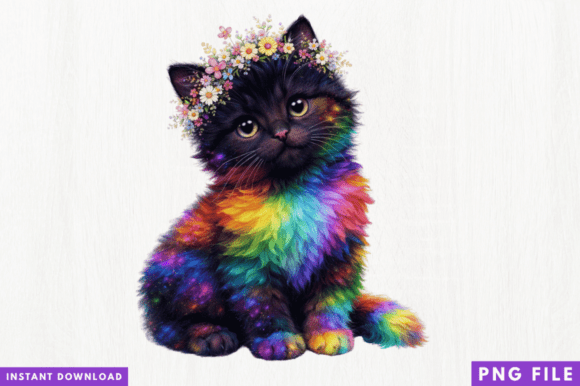
Rainbow Kitten PNG Design: Elevating Your Sublimation Projects with Professional Quality
Bringing your creative ideas to life often hinges on the quality of your source material, and the Rainbow Kitten PNG Design offers a vibrant starting point for crafters and small business owners alike. This digital asset is specifically engineered for sublimation printing, t-shirt design, mugs, tote bags, and various other merchandise. With a high-resolution format and a transparent background, this design eliminates the tedious editing phase, allowing you to move straight from download to production. However, possessing a high-quality file is only half the battle; understanding how to leverage it correctly determines whether your final product looks professional or amateurish.
For entrepreneurs and hobbyists targeting the trendy aesthetic market, this Rainbow Kitten graphic serves as a versatile foundation. It is compatible with industry-standard software like Cricut Design Space, Silhouette Studio, Photoshop, and Canva, making it accessible regardless of your technical expertise level. Yet, even with instant digital downloads and ready-to-print formats, users frequently encounter preventable issues that compromise print clarity, color accuracy, and overall satisfaction. Addressing these common pitfalls early ensures your investment in digital art translates into tangible, sellable quality.
Overlooking Resolution Requirements for Different Substrates
One of the most frequent mistakes creators make when using the Rainbow Kitten PNG Design is assuming a single resolution works universally across all products. While this file is high-resolution, "high" is relative to the physical size of your print area. A file that looks crisp on a standard coffee mug may appear pixelated or soft when stretched across an adult-sized t-shirt or a large tote bag. Pixelation occurs when the pixel density drops below 300 DPI (dots per inch) at the intended print size, resulting in a blurry image that customers associate with low-quality goods.
To avoid this, always check the actual pixel dimensions of your downloaded PNG before placing it in your design software. Calculate the required resolution based on your specific substrate. For example, if you are printing a 10-inch wide design on a shirt, you need a file that is at least 3000 pixels wide to maintain 300 DPI. If the Rainbow Kitten PNG Design does not meet this threshold for larger items, consider using it for smaller applications like stickers, phone cases, or greeting cards where the native resolution provides superior sharpness. Never upscale a raster PNG using basic stretch tools, as this artificially inflates file size without adding detail. Instead, use AI upscaling tools specifically designed for print if enlargement is absolutely necessary, or select a different design optimized for large-format printing.
Misunderstanding Transparent Backgrounds and Layer Management
The transparent background feature is a primary selling point of this digital download, yet many users inadvertently negate this benefit through improper file handling. A common error involves opening the PNG in software that automatically fills transparency with white, or saving the file in a format like JPEG after editing, which permanently destroys the alpha channel. When this happens, the rainbow kitten appears inside a solid white box rather than blending seamlessly with your shirt or mug color, ruining the professional aesthetic and wasting materials.
Always verify transparency immediately upon importing the file into your workspace. In programs like Canva or Silhouette Studio, ensure the background layer remains locked or hidden. If you are combining the Rainbow Kitten PNG Design with other elements, keep the original PNG on its own layer and never flatten the image until you are ready to export the final print file. Additionally, be mindful of "ghosting" artifacts sometimes left by automated background removal tools. Inspect the edges of the kitten graphic at 100% zoom against a dark background in your software to ensure no faint white halos remain. Catching these edge defects digitally saves you from pressing a flawed design onto expensive blanks.
Neglecting Color Profile Differences Between Screen and Print
Digital files display in RGB (Red, Green, Blue) color space, while sublimation printers typically operate in CMYK (Cyan, Magenta, Yellow, Key/Black). This fundamental difference explains why the vibrant neon hues of the Rainbow Kitten PNG Design might look duller or shifted in tone once printed. Relying solely on your monitor’s representation is a costly mistake that leads to inconsistent product batches and customer returns. Monitor calibration varies wildly between devices, meaning the colors you see during editing are merely an approximation.
Professional results require proactive color management. Before running a full production batch, always print a test swatch on the exact substrate you intend to sell. Use ICC profiles specific to your printer, ink, and paper combination to bridge the gap between screen and print. If the rainbow colors appear muddy, adjust the saturation or vibrance within your RIP software or design program specifically for print output, not for screen viewing. Document your successful settings for future use. Understanding that the digital file is a starting point, not a guaranteed color match, helps set realistic expectations and ensures the final product meets professional standards.
Ignoring Licensing and Commercial Usage Boundaries
While the Rainbow Kitten PNG Design is marketed to small business owners and print-on-demand creators, failing to read the specific license terms is a significant oversight. Not all digital downloads grant unlimited commercial rights. Some licenses restrict the number of physical units you can produce, prohibit use on certain platforms like Etsy or Amazon, or forbid incorporating the design into new digital products for resale. Violating these terms can result in shop suspensions, legal notices, or reputational damage within the crafting community.
Treat the license agreement as part of your product specification sheet. Before listing any item featuring this design, confirm whether your purchase includes commercial licensing or if an upgrade is required. Keep a record of your receipt and license file alongside your project assets. If you plan to scale your business beyond initial sales projections, verify that the license scales with you. Ethical sourcing and clear usage rights are just as important as print quality; they protect your business longevity and ensure you are supporting digital artists fairly. When in doubt, reach out to the creator for clarification rather than assuming permission.
Maximizing Value Through Strategic Application
Beyond avoiding errors, getting the most from this Rainbow Kitten PNG Design involves strategic application. Because the file requires no editing, it is ideal for rapid prototyping. Test market response by creating mockups for pillows, wall art, and apparel simultaneously using the same high-quality asset. This efficiency allows you to identify which product category resonates with your audience before committing to inventory. Remember that this is a digital file only; no physical product will be shipped. Managing this expectation clearly in your own workflow prevents confusion, especially if you collaborate with team members who might expect a physical sample.
Ultimately, the success of your sublimation projects depends on treating digital assets with the same rigor as physical materials. By respecting resolution limits, preserving transparency, managing color expectations, and adhering to licensing terms, you transform a simple PNG download into a reliable component of your creative business. The Rainbow Kitten PNG Design offers tremendous potential for trendy, professional merchandise, provided you approach it with informed preparation and attention to technical detail.