Ornate Frame Corner Vector Design for Crafts
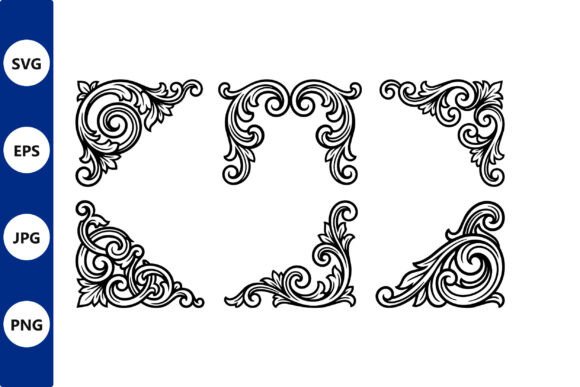
Elevating a simple project into something that feels bespoke often comes down to the details at the edges. An ornate frame corner vector design serves as more than just a decorative border; it acts as an architectural anchor for your creative work. Whether you are designing a formal wedding invitation, cutting wooden wall art, or branding a luxury product, these intricate silhouettes provide immediate visual weight and historical elegance. The true value of a premium vector set lies in its versatility. Unlike raster images that pixelate when resized, vector-based corners maintain crisp, clean lines whether they are scaled down for a business card or expanded for large-format signage.
For makers using laser cutters, Cricut machines, or CNC routers, having meticulously cleaned-up files is non-negotiable. Stray nodes, open paths, and overlapping lines can ruin a cut or waste expensive material. A high-quality silhouette set eliminates this technical friction, allowing you to focus entirely on composition and application. When you have access to SVG, EPS, PNG, and JPG formats in a single package, the barrier between concept and creation disappears. You can drag and drop these elements directly onto your canvas, confident that the geometry is sound and ready for production.
Applications in Paper Goods and Print Design
The most traditional home for ornate corners remains paper goods, but modern designers are reimagining how these elements function. In certificate and diploma design, corner flourishes establish authority and tradition. However, rather than placing identical corners on all four sides, consider using asymmetrical placement to create dynamic tension. A heavy, baroque-style corner in the top left paired with a lighter, mirrored element in the bottom right can guide the viewer’s eye across the page more effectively than a static box.
For restaurant menus and event invitations, these vectors solve common layout challenges. Text-heavy documents often feel unanchored without visual boundaries. Instead of drawing full border lines that can make content feel trapped, use corner accents to suggest a frame without enclosing the space. This approach keeps the design breathable while still feeling structured. Because these sets are available in high-resolution PNG and JPG formats, print designers can easily adjust opacity or apply texture overlays to match the paper stock, ensuring the digital ornament looks organic on physical media.
Digital Adaptation for Web and Social Media
Creatives working in digital spaces can leverage these classic motifs to add warmth to sterile interfaces. Bloggers and social media managers can use ornate corners to frame quote graphics, featured images, or promotional announcements. The key to successful digital adaptation is contrast. A solid black vector corner against a white background reads as stark and graphic, perfect for minimalist brands. Conversely, placing the same corner over a textured photograph or colored background softens the aesthetic, making it suitable for lifestyle or heritage brands.
When using these designs for web headers or email newsletters, ensure the file size remains optimized. While the source EPS or SVG files are essential for editing, exporting flattened PNGs with transparent backgrounds ensures fast loading times without sacrificing edge quality. This practical step maintains site performance while delivering the visual impact of custom illustration.
Fabrication: Laser Cutting and CNC Woodworking
For the maker community, an ornate frame corner vector design is a functional component. Laser cutting and CNC machining require specific geometric considerations that differ from print design. Premium sets intended for fabrication feature continuous paths and appropriate bridge widths to prevent delicate filigree from snapping during the cutting process. When selecting corners for wooden wall art or metal decor, always test the scale relative to your material thickness. Intricate details that look beautiful on screen may become fragile splinters when cut from 3mm plywood or acrylic.
Metal fabricators and woodworkers can also use these corners as inlay templates or stencil guides. By treating the vector as a negative space mask, you can etch or paint ornate details onto flat surfaces without needing advanced freehand skills. This technique is particularly effective for creating consistent branding on custom furniture, jewelry boxes, or architectural millwork. The ability to mirror and rotate vector corners allows for seamless pattern matching across multiple pieces, ensuring professional consistency in batch production.
Personalization and Body Art
Tattoo artists and body art enthusiasts frequently utilize ornamental vectors as foundational references. The scalability of SVG and EPS formats makes them ideal for resizing designs to fit different body contours. However, direct application requires artistic interpretation. Vectors provide the structural skeleton, but the artist must adapt line weights and shading to suit skin tone and muscle flow. Using a premium silhouette set saves hours of drafting time, providing a reliable base structure that can be customized with organic textures or integrated with other illustrative elements.
Similarly, decal and vinyl creators can produce sophisticated window clings or vehicle graphics using these corner sets. The clean edges of a well-prepared vector file ensure that weeding—the process of removing excess vinyl—is straightforward and precise. For commercial applications like storefront branding or fleet vehicle decoration, this efficiency translates directly to profitability.
Best Practices for Integration and Consistency
Owning a versatile asset library is only the first step; integrating it effectively requires intentionality. To keep your results clear and audience-friendly, adhere to a few guiding principles when working with ornate frame corner vector designs.
- Maintain Visual Hierarchy: Never let the ornament overpower the content. The corner should support the message, not compete with it. If your text becomes difficult to read against the flourish, reduce the opacity or increase the padding.
- Respect Historical Context: Different ornamental styles carry different connotations. Art Nouveau curves suggest organic elegance, while Victorian baroque implies formality. Match the style of the corner to the tone of your project to avoid cognitive dissonance.
- Check Licensing for Commercial Use: Always verify that your digital files include commercial rights. Premium sets typically grant broad usage permissions, but confirming this protects your business when selling finished products or client work.
- Organize Your Asset Library: Keep your SVG, EPS, PNG, and JPG files clearly labeled and categorized. Creating a standardized folder structure saves time during active projects and prevents version control issues.
Balancing Ornamentation with Modern Sensibilities
There is a fine line between elegant embellishment and visual clutter. Contemporary audiences appreciate ornamentation when it feels purposeful rather than gratuitous. One effective strategy is to isolate specific elements from a complex corner design. Many vector sets allow you to ungroup components, letting you extract a single leaf, scroll, or floral motif. These smaller fragments can be used as subtle dividers, bullet points, or watermark elements that echo the main theme without overwhelming the layout.
Color choice also plays a critical role in modernizing traditional forms. While black silhouettes offer maximum contrast and classic appeal, experimenting with metallic gradients, muted earth tones, or monochromatic brand colors can make vintage aesthetics feel fresh and relevant. For digital products, consider animating the corner elements subtly—a slow fade-in or gentle rotation can add a layer of sophistication to video content or interactive presentations.
Maximizing Value Across Formats
The inclusion of multiple file formats in a premium vector set is designed to streamline workflows across different disciplines. Understanding when to use each format maximizes both quality and efficiency. Use SVG files for web graphics, Cricut Design Space, and scalable illustrations where editability is required. Choose EPS for professional printing, large-format output, and Adobe Illustrator workflows. Rely on PNG for quick mockups, digital overlays, and projects requiring transparent backgrounds without further editing. Reserve JPG formats for reference, mood boards, or contexts where transparency is unnecessary and file compatibility is paramount.
Ultimately, an ornate frame corner vector design is a tool for communication. It signals care, craftsmanship, and attention to detail. Whether you are a freelancer building a portfolio, a small business owner packaging handmade goods, or an educator creating engaging course materials, these decorative elements bridge the gap between functional design and emotional resonance. By choosing meticulously prepared assets and applying them with thoughtful restraint, you transform standard outputs into memorable experiences that resonate with your audience.